How to Benchmark GPU-to-GPU Networking with Cornelis CN5000 and AMD Instinct MI300X

Key takeaways
Shorten GPU-network evaluation time: Follow a documented procedure to install ROCm, Open MPI, libfabric/OFI, and OSU Micro-Benchmarks, then measure GPU-buffer latency and bandwidth on AMD Instinct MI300X systems with CN5000.
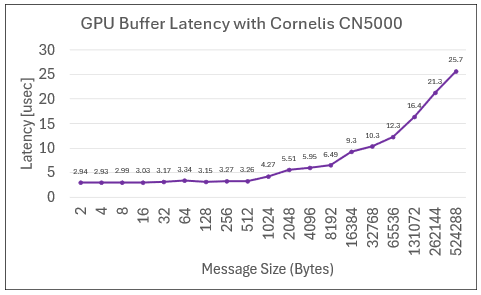
Experience minimal GPU-to-GPU communication latency : The tested two-node configuration measured as low as 2.94 microseconds for GPU-buffer transfers using the
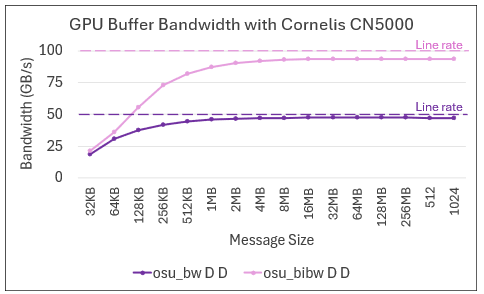
dma-bufpath.Achieve full network bandwidth: The tested configuration reached up to 94% of unidirectional and 93% of bidirectional line rate for GPU-buffer bandwidth.
How to set up and run GPU performance benchmarks
AMD Instinct MI300X GPU clusters are built for massive AI and HPC workloads, and Cornelis CN5000 Omni-Path® adds the scale-out fabric needed to move GPU data efficiently. CN5000 provides a high-performance 400 GB per-SuperNIC network for AI and HPC clusters including AMD GPUs, with industry-leading latency at full network line rate.
This blog describes how to set up and run GPU performance benchmarks using the Ohio State University’s Micro Benchmarks (OMB) suite. Once a user is running on AMD GPU-based nodes connected with CN5000, it is easy to showcase the performance benefits of using CN5000 when transferring buffers between GPUs using zero-copy data transfers with dma-buf. Cornelis CN5000, when combined with other hardware capabilities such as AMD’s xGMI and server PCIe switches, allows for direct GPU buffer transfers over the network without host CPU involvement. This means not only higher performance, but leaving the CPU cores free to do other work.
Prepare the MI300X test environment
This example targets one MI300X GPU on each node and measures point-to-point GPU-buffer latency and bandwidth across the network.
This procedure uses ROCm, Open MPI, libfabric/OFI, and OSU Micro-Benchmarks. Install the software in a directory that is available on both compute nodes, such as a shared home directory or another shared filesystem. If a shared filesystem is not available, install the same software versions in the same paths on both nodes.
Prerequisites & test environment
Before starting, prepare the following:
Two compute nodes: Each node must have at least one AMD Instinct MI300X GPU and a CN5000 network connection. The CN5000 SuperNICs can be connected to a switch or back-to-back in a smaller test environment.
Cornelis software: Install the Cornelis OPX Software on the nodes, which includes the hfi1 kernel driver and the libfabric opx provider.
Shared software path: Use a shared installation directory, or duplicate the installation on both nodes with matching paths and versions.
Test environment
The published measurements were collected on the following system configuration:
Component | Test configuration |
Test scope | Two nodes, with one MI300X GPU targeted on each node |
GPU | AMD Instinct MI300X |
CPU | Two-socket AMD EPYC™ 9534 system with 64 cores per processor |
CPU frequency | Turbo enabled with the acpi-cpufreq driver |
Operating system | Rocky Linux 9.6, Blue Onyx |
Kernel | 5.14.0-570.58.1.el9_6.x86_64 |
Memory speed | 4800 MT/s |
GPU software | ROCm 7.2.3 |
MPI | Open MPI 5.0.10 |
Benchmark | OSU Micro-Benchmarks 7.2.0 |
Network software | Cornelis OPX Software 12.4. hfi1 module parameters: |
Network adapter and port | 8 CN5000 SuperNICs per node (only 1 SuperNIC used in this specific test) |
Network topology | All CN5000 SuperNICs connected to a single CN5000 Switch |
GPU and NIC placement | One CN5000 SuperNIC and one MI300X GPU per numa (x8 16-core NUMA domains per node) |
The next sections show how to build the communication stack and OSU Micro-Benchmarks before running the latency and bandwidth tests.
Step 1: Download and install Open MPI with ROCm and libfabric/OFI support
In this example, the latest public Open MPI is used along with ROCm 7.2.3 and the libfabric as-provided with a Cornelis OPX Software host-based installation.
First, choose an installation path shared among the compute nodes in the cluster. This can be your home directory or another shared file system on the cluster.
WORKDIR=~/OMPI-OSU-MI300X-CN5000/
ROCMVERS=7.2.3
OMPIVERS=5.0.10
OSUVERS=7.5.2
OMPIDIR=${WORKDIR}/openmpi-${OMPIVERS}-rocm${ROCMVERS}-ofi
OSUDIR=${WORKDIR}/osu-${OSUVERS}
ROCM_HOME=/opt/rocm-${ROCMVERS}
Next, download and compile Open MPI.
tmpdir=$(mktemp -d);cd $tmpdir
export PATH=$ROCM_HOME/bin:$PATH
export LD_LIBRARY_PATH=$ROCM_HOME/lib:$LD_LIBRARY_PATH
wget https://download.open-mpi.org/release/open-mpi/v5.0/openmpi-${OMPIVERS}.tar.gz
tar -xf openmpi-${OMPIVERS}.tar.gz
cd openmpi-${OMPIVERS}
./configure --with-rocm=${ROCM_HOME} --with-cuda=no --with-ofi=/usr \
--enable-orterun-prefix-by-default LDFLAGS=-Wl,--enable-new-dtags \
--prefix=$WORKDIR/
make -j
make install
export PATH=${OMPIDIR}/bin:$PATH
export LD_LIBRARY_PATH=${OMPIDIR}/lib:$LD_LIBRARY_PATH
Step 2: Download and install OSU Micro-Benchmarks
Download and install the OSU Micro-Benchmarks, a benchmark suite developed by the Ohio State University, to measure MPI communication performance between GPU-resident buffers. The suite provides the latency and bandwidth tests used in this article, allowing readers to evaluate GPU-to-GPU communication over the CN5000 network.
cd $tmpdir
wget https://mvapich.cse.ohio-state.edu/download/mvapich/osu-micro-benchmarks-${OSUVERS}.tar.gz
tar xfz osu-micro-benchmarks-${OSUVERS}.tar.gz
cd osu-micro-benchmarks-${OSUVERS}
 ./configure CC=mpicc CXX=mpicxx  --enable-rocm --with-rocm=${ROCM_HOME} \
--prefix=$OSUDIR CFLAGS="-D__HIP_PLATFORM_HCC__= -D__HIP_PLATFORM_AMD__= \
-I${ROCM_HOME}/include -I/include"
make -j
make install
Step 3: Run latency and bandwidth benchmarks
Targeting one MI300X GPU on each of two nodes, low-latency and line-rate network bandwidth of CN5000 networks can be easily measured.
mpirun -np 2 --map-by ppr:1:node -host node1,node2 \
      -mca mtl ofi -mca btl self,sm -mca pml cm \
       -x FI_PROVIDER=opx -x FI_OPX_HFISVC=1 -x FI_HMEM_ROCR_USE_DMABUF=1 \
${OSUDIR}/libexec/osu-micro-benchmarks/mpi/pt2pt/osu_latency
To measure unidirectional and bidirectional bandwidth, replace osu_latency with osu_bw or osu_bibw, respectively. The Cornelis OPX libfabric provider automatically choses the most optimal SuperNIC on the node, closest to the CPU process in use. In order to ensure proper CPU core, GPU, and SuperNIC affinity, use explicit process binding, ROCR_VISIBLE_DEVICES, and FI_OPX_HFI_SELECT flags when necessary.
Step 4: Admire the latency and bandwidth results
Latency
CN5000 achieves as low as 2.94 microseconds (2.99 microseconds at 8 bytes) between two GPU buffers using dma-buf, measured with osu_latency, including a switch hop. Low latency is crucial to keep both HPC and AI-based applications performing their best and not waiting on the network. At larger scale, communication delays can cause huge losses in CPU and GPU productivity, triggered by serialized compute/communication, and workload imbalance. A low latency CN5000 network helps minimize this impact.
Bandwidth
Not only does Cornelis CN5000 transfer GPU buffers with low latency, but it also achieves up to 94% (uni-directional) and 93% (bi-directional) line rate bandwidth. Line-rate bandwidth is essential for both HPC/MPI and RCCL collective communications during AI training and inference. Because the MI300X platform’s aggregate intra-node XGMI bandwidth far-exceeds a single SuperNIC’s bandwidth, multiple SuperNICs are installed in MI300X clusters to prevent the network from being a bottleneck. The ultimate goal is having balanced intra and inter-node bandwidth for the GPU communications.
This article showcases the fundamental performance capability of CN5000 connecting two AMD Instinct MI300X GPUs. Look for future articles showing more detailed benchmarks and performance advantages with CN5000. For deeper guidance, visit the public Cornelis CN5000 website including the CN5000 Performance Tuning Guide.
Talk to a fabric architect
The procedure in this article provides a starting point for measuring GPU-buffer latency and bandwidth on an AMD Instinct MI300X and Cornelis CN5000 system. Run the benchmark in your own environment, record the hardware, software, topology, and placement details, and compare results under equivalent conditions. Because microbenchmark results vary with system configuration, validate them against representative application workloads before making deployment decisions.
If you are planning or evaluating a GPU cluster, talk with a Cornelis fabric architect. Share your GPU model, node count, communication pattern, network topology, ROCm and MPI versions, and target metrics. A fabric architect can help you define a representative benchmark plan, identify configuration variables that may affect the results, and determine the next step for evaluating CN5000 in your environment.
Talk to a Cornelis fabric architect about your GPU networking evaluation.