Get More from Your 400 Gb/s Fabric: Lessons from Lenovo’s Cornelis CN5000 Validation

Key takeaways:
Get more value from a 400 Gb/s fabric investment: Lenovo measured 378–391 Gb/s across tested node pairs, averaging 385 Gb/s—nearly 100% of the nominal line rate.
Accelerate communication-intensive HPC and AI workloads: The validated configuration delivered node-to-node latency as low as approximately 1.1 µs on Lenovo ThinkSystem SC750 V4 servers powered by Intel Xeon 6 processors.
Reduce deployment risk and time spent tuning: Lenovo’s LP2474 guide documents the tested firmware, Fabric Manager, cabling, and MPI settings, giving teams a validated starting point instead of a blank page
Make every bit of your 400 Gb/s HPC network count
When you invest in a 400 Gb/s fabric, the gap between “installed” and “optimized” is measured in real money — idle CPU cores, longer job queues, and fewer HPC simulations completed per day. A fabric running at 70% of its potential quietly taxes every workload on the cluster. Getting deployment and tuning right the first time is what turns a capital purchase into sustained scientific output.
This isn’t theory. Lenovo’s EveryScale team validated the full deployment in their HPC Benchmarking Centre on ThinkSystem SC750 V4 servers powered by Intel Xeon 6 processors — a real cluster, real cables, and real benchmarks.
A fast network can still underperform
A high-performance interconnect is only as fast as its weakest configuration step. A firmware level that’s slightly off, a cable on the wrong switch port, or an MPI stack left at defaults can silently cost 10–20% of your performance. And because the loss is invisible without careful benchmarking, most teams never know it’s there.
The Last Mile to an Efficient HPC Cluster
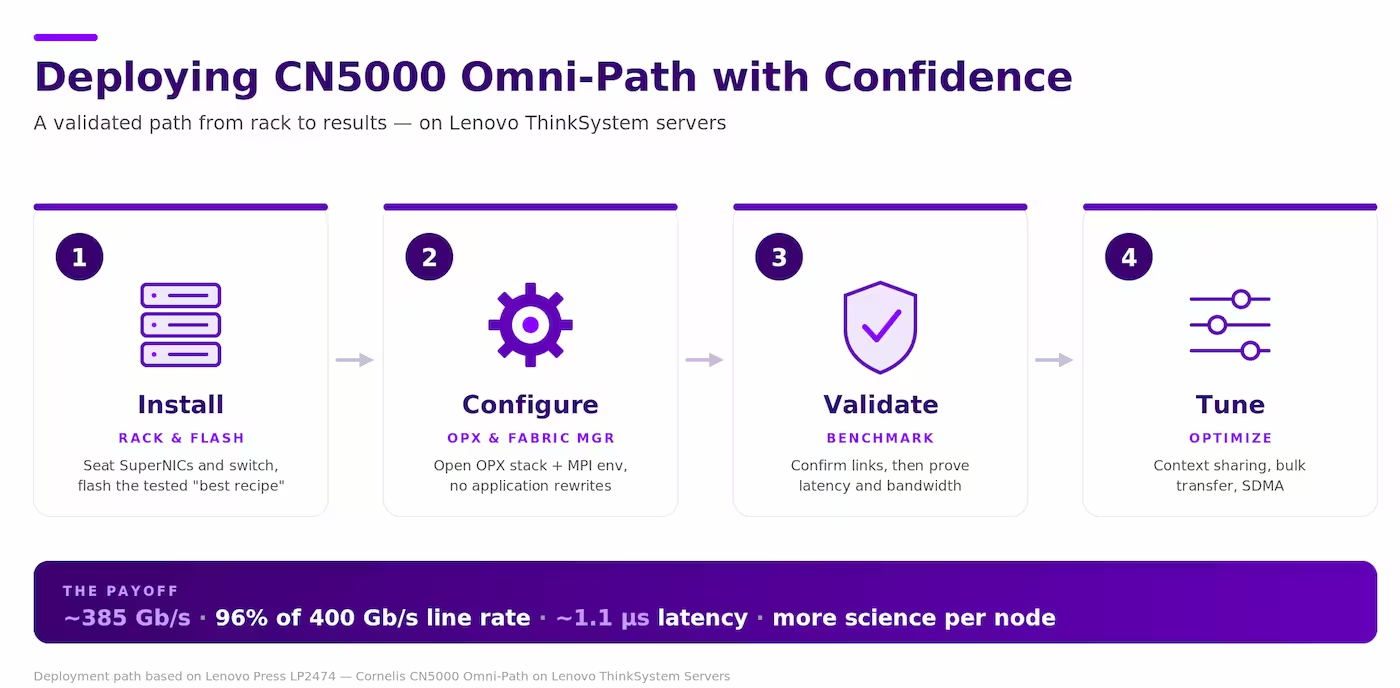
CN5000 is a complete 400 Gb/s end-to-end Omni-Path fabric with credit-based flow control, fine-grained adaptive routing, delivered on an end-to-end network of SuperNICs and Switches built for over 800 million messages per second. But raw capability has knobs. A dual-socket, 128-core node defaults to 208 MPI contexts — not enough to feed every core without context sharing. Cable length dictates which switch ports deliver latency-optimized links. The fabric manager needs the right port and adapter configuration to sweep the fabric cleanly. None of these are defects; they’re the settings that decide whether you get spec-sheet performance or something less.
From high-speed hardware to a tuned HPC system
Cornelis doesn’t hand you hardware and walk away. Together with Lenovo, we publish experience-based best-practice guides drawn from real deployments — pairing the open Cornelis OPX (Omni-Path Provider) software stack with documented, repeatable tuning. OPX is OpenFabrics-compliant and built on OFI/libfabric, so it runs Open MPI, MPICH, MVAPICH, and NCCL/RCCL with no application rewrites. The tunables that matter — MPI context sharing, bulk transfer service, and SDMA — are spelled out, not left to guesswork. Our goal is simple: help you squeeze every ounce of value from the network you already paid for, so your cluster is not held back by the network.
What Lenovo measured on ThinkSystem servers
The proof, straight from the Lenovo benchmarking center:
Bandwidth: 378–391 Gb/s measured across all node pairs (averaging 385 Gb/s) — roughly 96% of the 400 Gb/s line rate.
Latency: as low as ~1.1 microseconds node-to-node, delivering one of the industry’s lowest end-to-end latency for cluster networking
Repeatability: every firmware level, command, and tunable is documented against Lenovo’s tested “best recipe.”
The advantages of CN5000 expand beyond what Lenovo specifically tested. CN5000 SuperNICs are engineered for 800M+ messages per second — the currency of MPI collectives and AI communication and the OPX stack (OFI/libfabric) run today’s MPI and AI libraries with no application rewrites.
Evaluate the deployment, not the spec sheet
When you evaluate an HPC fabric, look past the peak numbers on the spec sheet and ask what happens after the purchase order. Does the vendor publish validated reference architectures and tested firmware “best recipes”? Is the software stack open and compatible with your existing MPI and AI libraries? And are the performance tunables documented and matched to your CPU SKU — since core count, sockets, and cabling all change the right settings? The answers determine how much of that 400 Gb/s you’ll actually use.
How to get started
Leverage the full guide, written by networking experts. Lenovo’s “Installation and Best Practices for Implementing Cornelis CN5000 Omni-Path on Lenovo ThinkSystem Servers” (Lenovo Press, LP2474) walks through the entire deployment step by step. Then talk to the Cornelis team about bringing the same confidence to your own cluster.
Share this post on LinkedIn